School Network Security: What K-12 Districts Actually Need to Get Right
By Ray Maynez | Eaton & Associates
If you run IT for a school district, you already know the problem isn’t whether your network will be targeted, it’s whether you’ll see the attack coming and whether your infrastructure can take the hit without putting kids’ data on the dark web.
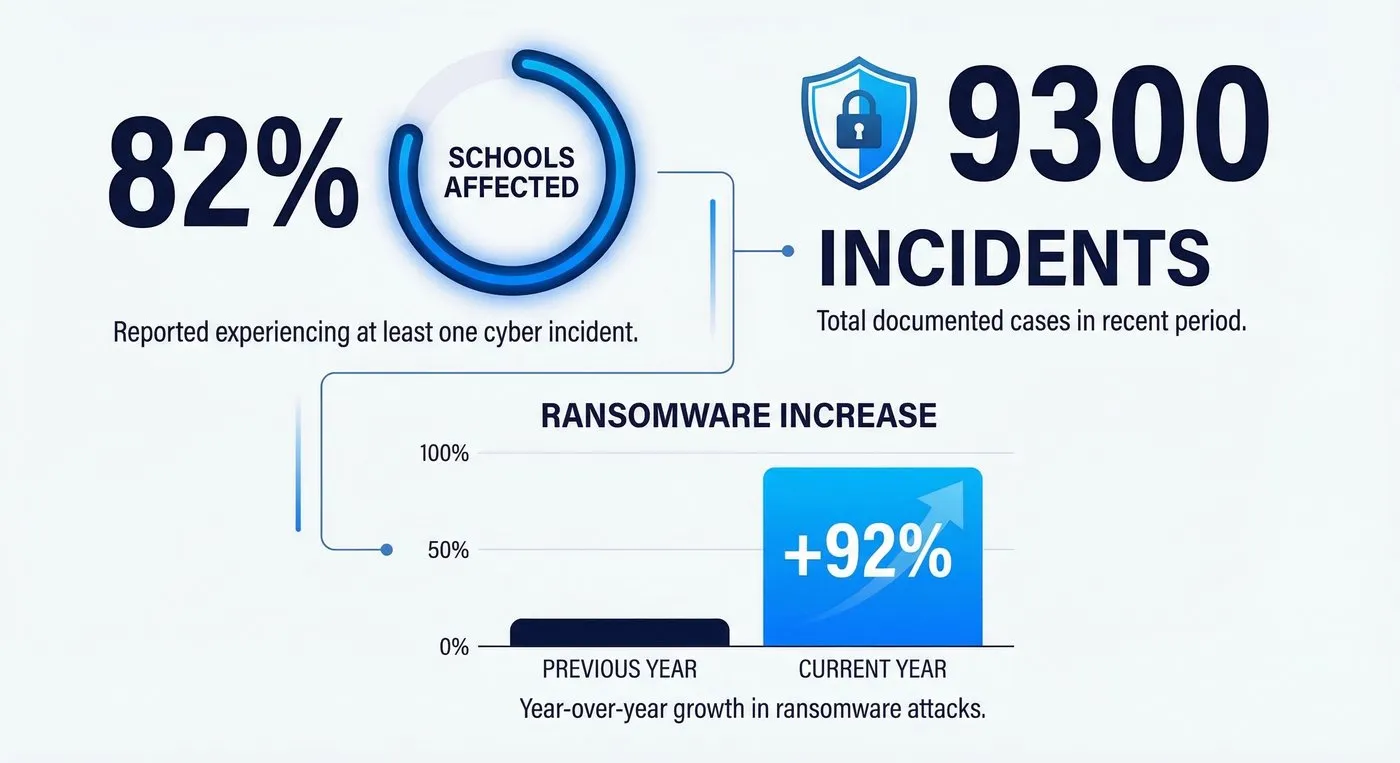
The numbers are stark. According to the 2025 CIS MS-ISAC K-12 Cybersecurity Report, which analyzed more than 5,000 K-12 organizations between July 2023 and December 2024, 82% of reporting schools experienced a cyber threat impact, resulting in over 9,300 confirmed cybersecurity incidents in less than two years. This isn’t a wave, it’s a permanent new baseline.
This article is for the IT director who inherited a flat network from 2012, the superintendent who just got asked about cyber insurance, and the tech coordinator trying to explain to a school board why they need to spend money they don’t have on something they can’t see. We’re going to cover what’s actually happening out there, what your network needs to look like, and what practical steps you can take right now, with or without a big budget.
The Threat Landscape Is Real, and It’s Targeting You Specifically
Schools aren’t getting hit incidentally. Threat actors go after districts on purpose.
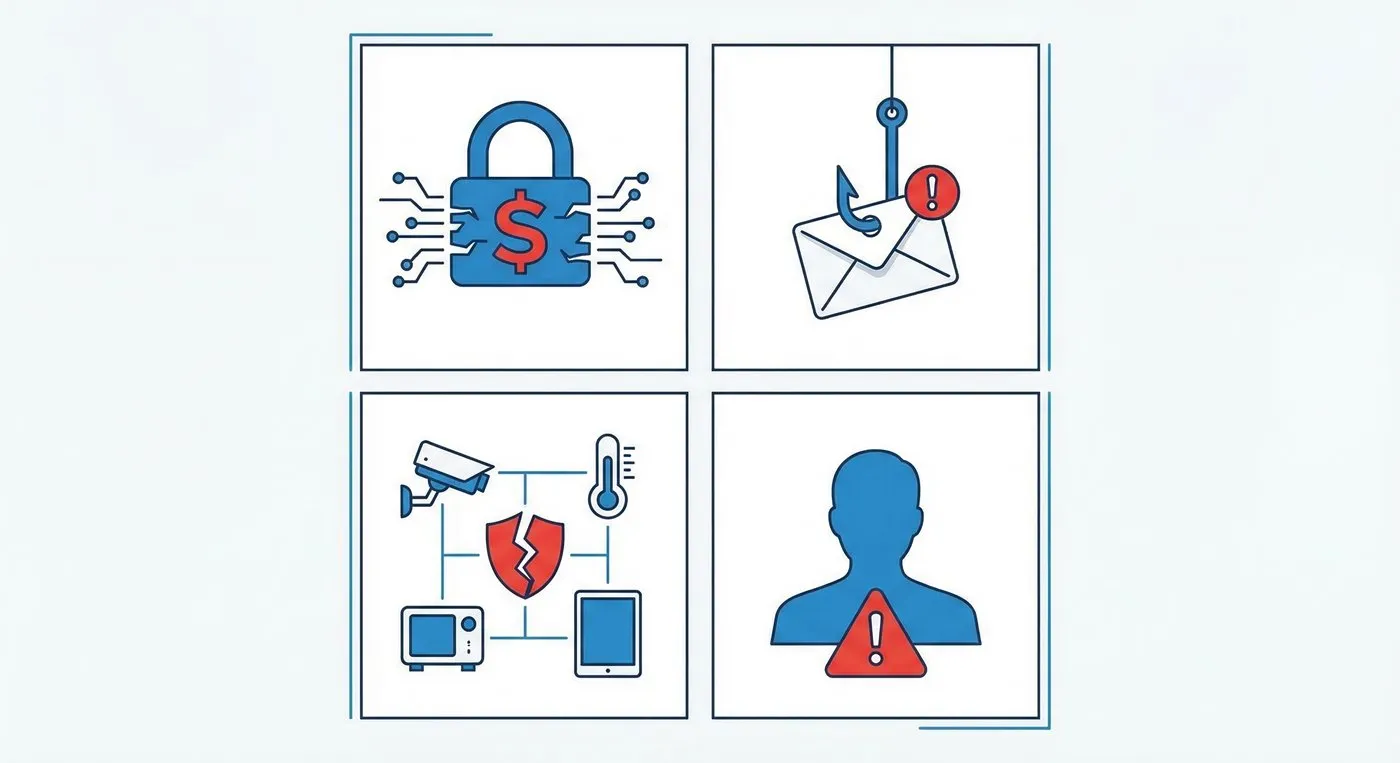
The U.S. Department of Homeland Security has called K-12 districts “a near constant ransomware target.” The reasons are fairly predictable: large stores of sensitive personal data (Social Security numbers, medical records, financial information for families), chronically underfunded IT departments, aging infrastructure, and, critically, a history of paying ransoms. According to a 2024 Sophos report, 62% of lower education institutions that experience a ransomware attack end up paying, with average ransom payments hitting $7.5 million.
That payment track record makes you a repeat target. Once the cybercriminal ecosystem knows schools pay, they keep coming.
From January 2023 through June 2024, K12 SIX documented at least 83 potential ransomware attacks on K-12 public school districts. In 2023 alone, ransomware attacks against K-12 schools jumped 92% year-over-year, from 51 attacks in 2022 to 98 in 2023. The average ransom demand for education targets stands at $847,000.
The most common entry point isn’t a zero-day exploit. It’s a phishing email. The CIS report found that human-targeted attacks, phishing and social engineering, were the primary attack vector, exceeding all other techniques by roughly 45%. Your biggest vulnerability is in the inbox, not the server room.
Beyond ransomware, the threat landscape in schools includes:
- Business email compromise (BEC), 45% of schools in the CIS study reported compromised business email accounts
- Data breaches, 14% of schools experienced a breach of student or staff records
- Supply chain attacks, The late-2024 PowerSchool breach compromised student names, Social Security numbers, birth dates, and medical alerts across thousands of districts using the platform, demonstrating that your exposure extends to every vendor you trust
- Denial-of-service attacks, class invasion (Zoom bombing), and website defacement round out the bottom of the frequency chart, but they’re operationally disruptive when they hit
The most active ransomware groups targeting education, RansomHub, LockBit, Medusa, and Play, are sophisticated, well-resourced operations with active CISA advisories. This is not script-kiddie territory.
Why School Networks Are Uniquely Hard to Defend
Understanding why schools are vulnerable isn’t about assigning blame, it’s about designing solutions that fit the actual environment.
Structural understaffing is the rule, not the exception. Two-thirds of U.S. school districts had no full-time cybersecurity position in 2023. Twelve percent dedicated no budget whatsoever to cybersecurity. The average district IT team is one or two generalists wearing every hat simultaneously, help desk, infrastructure, compliance, and now threat response.
Flat networks are everywhere. Many districts still run networks where a compromised student Chromebook in sixth period English can theoretically reach the payroll server. CISA has specifically called out school flat networks as a primary driver of attack escalation: “A lot of times, they’re flat networks that use a ton of different applications, which are inherently meant to be easy to access and user friendly, which creates a large surface area for any sort of threat actor.”
The device count is staggering. A mid-sized district with 5,000 students might have 10,000 to 15,000 devices on the network on any given day, student Chromebooks, teacher laptops, smart boards, security cameras, HVAC controllers, attendance kiosks, library systems, buses with GPS transponders, and whatever personal phones students are connecting to guest Wi-Fi. Each device is a potential entry point.
IoT is the quiet liability. Smart thermostats, IP cameras, door access controllers, and lab sensors are often deployed without any security review. They run outdated firmware, use default credentials, and sit on the same network as student data. These devices are rarely in the IT asset inventory, let alone a patch management system.
Legacy systems don’t go away. Budget constraints mean districts run software and hardware well past end-of-life. A student information system from 2010 or a firewall that stopped receiving updates two years ago isn’t just a compliance problem, it’s an open door.
What a Properly Segmented School Network Actually Looks Like
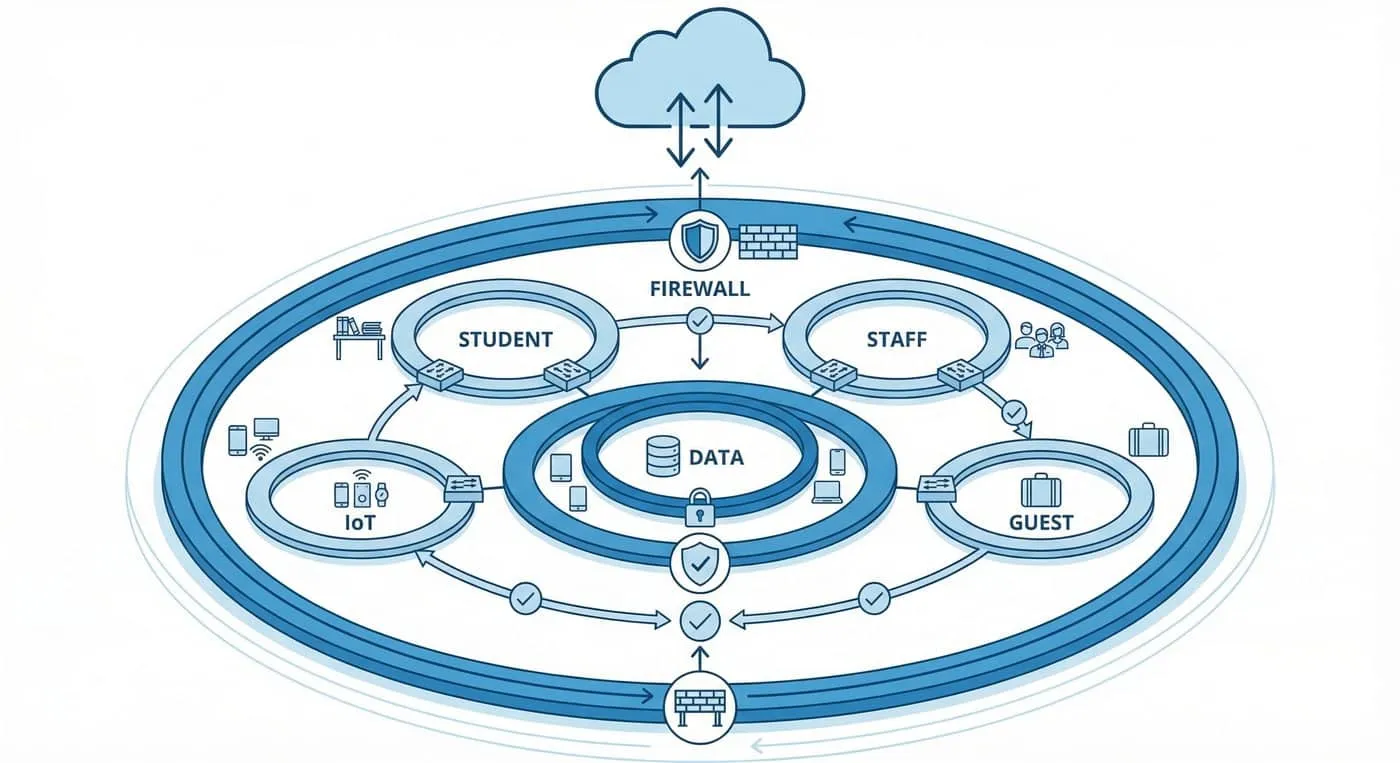
The single highest-ROI architectural change most school districts can make is network segmentation. This isn’t a complicated concept, but the execution requires intentionality.
A properly segmented school network divides traffic into isolated segments, typically VLANs, so that a compromise in one segment doesn’t automatically mean access to the rest. Here’s how we think about the layers:
Staff and administrative network, This is your most sensitive segment. Payroll, HR systems, student information systems with FERPA-protected data, and financial accounts live here. Only managed, district-issued devices should be on this segment. Staff should authenticate with certificates or MFA-backed credentials, not just a password.
Student network, Managed 1:1 devices (Chromebooks, iPads) get internet access and access to learning platforms, but they should not be able to reach administrative systems. Content filtering is a compliance requirement under CIPA, but it’s also a security control, blocking malicious sites before students accidentally download something.
Guest / BYOD network, Personal phones, parent devices at events, substitute teachers, visiting speakers. Internet access only. No access to internal resources. This should be a captive portal with acceptable use acknowledgment and bandwidth throttling to prevent abuse.
IoT / building automation network, Every IP camera, HVAC controller, badge reader, and smart board belongs here. These devices need to talk to the internet or management consoles; they do not need to talk to student data. Hard firewall rules between IoT and everything else.
Infrastructure / management network, Switches, access points, UPS systems, and server management interfaces. Air-gapped from student and guest traffic. Access restricted to IT staff only, with separate credentials from normal user accounts.
The principle is simple: if a ransomware actor compromises a student Chromebook, they should hit a firewall wall when they try to move laterally toward payroll. Segmentation is that wall.
For wireless, WPA2-Enterprise with 802.1X authentication is the standard for any network handling sensitive data. It assigns certificates to devices rather than relying on a shared password, which means a student can’t walk up to the staff SSID and type in a password they overheard. RADIUS-based authentication tied to your directory service (Active Directory or Google Workspace) makes access revocation instant when someone leaves.
The Practical Security Stack for K-12 (Without Breaking the Budget)
Segmentation is the foundation, but it’s not the whole structure. Here’s what a realistic K-12 security stack looks like when you’re working with real-world constraints:
Firewall with next-gen capabilities, A modern NGFW does more than block ports. It inspects application layer traffic, identifies anomalous behavior, and can alert you when a device starts behaving like malware (beaconing to external IPs, scanning internal hosts). This is non-negotiable. If you’re still running a legacy stateful firewall, upgrading this is your first priority.
DNS filtering, Simple, cheap, and effective. Services like Cisco Umbrella, Cloudflare Gateway, or Infoblox BloxOne catch malicious domains before a connection is even established. For CIPA compliance and phishing protection simultaneously, this is high-value spend.
Endpoint detection and response (EDR) on managed devices, Traditional antivirus is insufficient against modern ransomware. EDR tools like CrowdStrike Falcon Go, Microsoft Defender for Endpoint, or SentinelOne provide behavioral detection and rollback capability on managed endpoints.
Multi-factor authentication (MFA) on all administrative accounts, Email, VPN, SIS, financial systems. Every administrative account. This is the single most effective control against business email compromise and credential-stuffing attacks. CISA offers free guidance on MFA implementation and doesn’t charge for it.
Patch management discipline, Two-thirds of ransomware attacks exploit known vulnerabilities with available patches. A consistent, documented patch cycle for all managed systems, operating systems, applications, firmware, eliminates a huge slice of the attack surface.
Offline, tested backups, If ransomware hits, your recovery speed depends entirely on your backup hygiene. Backups that are connected to the network can be encrypted by ransomware too. The standard is a 3-2-1 approach: three copies, two different media types, one offsite or air-gapped. And test restores quarterly, a backup you’ve never tested is a backup you don’t actually have.
SIEM or managed detection and response (MDR), For districts that can’t staff a security operations function in-house, a managed detection service provides 24/7 monitoring for a monthly fee, often cheaper than a single additional staff position.
The Human Layer: Staff Training Isn’t a Box-Check Exercise
Technology controls only go so far. The CIS data is unambiguous: phishing is the dominant attack vector. That means your staff, administrators, teachers, counselors, front office staff, are on the front line whether they signed up for it or not.
Security awareness training that works isn’t a 20-minute annual video followed by a quiz. Effective programs use simulated phishing campaigns (send a fake phishing email to staff, see who clicks, provide immediate feedback), short recurring microtraining, and clear reporting pathways so staff know exactly what to do when something looks off.
Specific behaviors to train for:
- Recognizing BEC attempts, Fake wire transfer requests, fake invoice changes, impersonation of superintendents or principals. Finance staff should have a verbal verification protocol for any out-of-band money movement request.
- Credential hygiene, Strong, unique passwords. A district password manager eliminates the “I’ll just use the same password everywhere” behavior.
- Phishing indicators, Urgency, mismatched sender domains, unexpected attachments, requests for login credentials.
- Reporting culture, Staff need to feel safe reporting a click on a suspicious link immediately. Shame-based cultures lead to delayed incident reporting, which dramatically worsens outcomes.
Extend training to students too. Digital citizenship programs that cover phishing, social engineering, and responsible network use create a culture where students are part of the security solution rather than an uncontrolled variable.
Funding the Work: E-Rate, FCC Pilots, and State Grants
One of the most common objections to school cybersecurity investment is “we don’t have the budget.” That’s increasingly less true, if you know where to look.
E-Rate remains the primary federal mechanism for funding school network infrastructure. The program covers eligible network equipment, fiber, and managed services, with reimbursement rates up to 90% for high-poverty districts. For districts planning network modernization, E-Rate should be the first line of funding. Read our full breakdown of the E-Rate application process for California schools in 2026.
The FCC’s $200 million Schools and Libraries Cybersecurity Pilot Program specifically targeted cybersecurity equipment and services for E-Rate-eligible entities. When the pilot opened, demand totaled $3.7 billion, nearly 20x the available funding, signaling just how significant the unmet need is. Subsequent rounds of this program or permanent inclusion of cybersecurity in E-Rate are actively being discussed at the FCC.
CISA’s free services shouldn’t be overlooked. Vulnerability scanning, phishing simulation, incident response planning, and the Cybersecurity Performance Goals (CPGs) framework are all available at no cost. For districts without resources for commercial security assessments, CISA’s resources are a legitimate starting point.
State and local cybersecurity grant programs, especially under the State and Local Cybersecurity Grant Program (SLCGP) funded through DHS, provide direct funding to state educational agencies that pass through to districts. Check with your state department of education for current cycle status.
If you’re also thinking about AI tools coming into your classrooms and what that means for your network and data governance, our K-12 AI readiness guide and AI governance framework for districts cover the practical side of those decisions.
Incident Response: Assuming the Worst So You’re Ready for It
Even well-defended networks get breached. The distinguishing factor between a recoverable incident and a catastrophic one is almost always the quality of the incident response plan, and whether it’s been tested.
A K-12 incident response plan needs to address:
Detection and escalation, Who gets called at 2 AM when the monitoring system alerts? What’s the decision tree for isolating a compromised segment? Clear escalation paths prevent the paralysis that lets ransomware spread for hours before anyone acts.
Containment, Network segmentation (which you’ve already built) makes containment faster. You can isolate a VLAN without taking down the whole district. Document the kill switches before you need them.
Communication, Parents, staff, the school board, the state education agency, law enforcement (FBI for ransomware), and your cyber insurance carrier all need to be notified according to different timelines. Know your state’s breach notification requirements before an incident.
Recovery, Prioritized restoration order: administrative systems and SIS first, then instructional systems, then everything else. Student data recovery trumps smart board connectivity.
Post-incident review, What did the attacker exploit? What did the team do well? What failed? Document it and update your defenses and plan.
The Minneapolis Public Schools ransomware attack in 2023 is a useful case study in what happens when incident response is reactive rather than planned. Hackers demanded $1 million after compromising over 100,000 individuals’ records. When the district didn’t pay, the attackers published files on the dark web, including student IDs, Social Security numbers, and health information. The data exposure was the more lasting harm.
What AI Is Doing to the Threat Landscape
It’s worth a brief note on where things are heading, because the threat picture in 2026 looks different than it did three years ago.
Generative AI has lowered the skill floor for phishing attacks dramatically. Spear phishing emails that used to require research and craft can now be generated at scale, personalized with publicly available information, and translated into flawless English from anywhere in the world. The “typos and bad grammar” heuristic for phishing detection is dead.
AI is also being used for faster vulnerability scanning and exploitation. The window between vulnerability disclosure and active exploitation has compressed significantly.
On the defensive side, AI-powered threat detection (behavioral analytics, anomaly detection in network traffic) is finding its way into commercial MDR products and SIEM platforms, and it genuinely helps, particularly for resource-constrained teams that can’t have humans watching dashboards 24/7.
The net effect: your training and your technical controls both need to keep pace with a threat actor toolkit that’s evolving faster than most district IT budgets. That’s the honest reality.
Frequently Asked Questions
How much should a school district spend on cybersecurity?
There’s no single right number, but a common benchmark is 10-15% of the total IT budget allocated to security. The GAO estimates that the average K-12 cyberattack costs between $50,000 and over $1 million in direct damages, not counting the long-term reputational and regulatory consequences. Most districts spend far less than that on prevention. The math isn’t hard.
What’s the first thing a district should do if they’ve never had a formal security program?
Start with an honest inventory. You can’t protect what you don’t know you have. Document every device on the network, every third-party application with student data, and every administrative account. From there, apply the NIST Cybersecurity Framework’s Identify function and let the gaps show you the priority order.
Is our student data protected if we’re using Google Workspace or Microsoft 365?
Partially. Cloud providers are responsible for the security of the infrastructure. You’re responsible for how you configure it, who has access, and how accounts are managed. A compromised admin account in Google Workspace can expose the entire district’s data. MFA on all administrative and teacher accounts is non-negotiable in cloud environments.
Do we need cyber insurance?
Yes, but read the policy carefully. Cyber insurance carriers are increasingly requiring demonstrable security controls (MFA, EDR, tested backups) as conditions of coverage. A policy that excludes incidents caused by failure to patch or absence of MFA may not pay when you need it most. Your insurance broker should be able to walk you through the current requirements.
What’s the real risk from IoT devices on our network?
High, and underappreciated. IP cameras, HVAC controllers, and building automation systems are frequently exploited as initial access points, not because the attacker wants your thermostat data, but because the device gives them a foothold on your network. Default credentials, unpatched firmware, and no monitoring make them easy targets. Put every IoT device on an isolated VLAN immediately.
How do we handle a ransomware attack if we’re mid-semester?
Isolate, don’t shut everything down. If you have network segmentation, you can contain the affected segment while keeping other systems online. Engage your incident response retainer (or call CISA’s 24/7 hotline: 1-888-282-0870), notify law enforcement, and activate your backup restoration process. Do not pay the ransom without consulting legal counsel and your insurance carrier, and be aware that paying doesn’t guarantee you get your data back or that it won’t still be published.
What’s the best way to explain cybersecurity funding needs to a school board that doesn’t see it as a priority?
Tell the story in dollars and operations. “A ransomware attack costs between $50,000 and $1 million and can take schools offline for weeks” lands differently than “we need more security tools.” Show them the K12 SIX incident map, the geographic visualization of attacks on districts like yours is a more effective communication tool than any slide deck.
The Bottom Line
School network security in 2026 is not a technology problem with a technology solution. It’s an organizational challenge that requires consistent architecture decisions, funded staffing, trained users, and tested processes, sustained over time, not executed once and forgotten.
The districts that weather cyberattacks best aren’t the ones with the biggest budgets. They’re the ones that built segmented networks, enforced MFA, trained their staff, tested their backups, and wrote down what to do when things go wrong. None of those require exotic technology. They require discipline.
If you’re running IT for a K-12 district in California and you’re looking for a structured assessment of where your current network stands, and a realistic roadmap for what to fix first, that’s the kind of work our team does. We've been in Bay Area school district infrastructure for years, and we know what's actually achievable on an education budget. Our K-12 cybersecurity services for Bay Area schools and districts cover the assessment, segmentation, MFA rollout, and tested-restore work that most California networks still need.
Ray Maynez is a senior consultant at Eaton & Associates, a Bay Area IT consulting firm with 35 years of experience serving schools, municipalities, and mission-driven organizations. Eaton & Associates helps K-12 districts navigate infrastructure modernization, E-Rate strategy, and cybersecurity planning.
Sources:
, CIS MS-ISAC, 2025 K-12 Cybersecurity Report (cisecurity.org)
, K12 Security Information Exchange (K12 SIX), Annual Cyber Incident Report, k12six.org
, Sophos, State of Ransomware in Education 2024
, U.S. Department of Homeland Security, 2024 Threat Assessment
, CISA, Protecting Our Future: Cybersecurity for K-12
, U.S. GAO, As Cyberattacks Increase on K-12 Schools, Here Is What’s Being Done
, FCC, Schools and Libraries Cybersecurity Pilot Program
, Emsisoft, 2024 Ransomware Report